
General directions
Bracket wall mounts
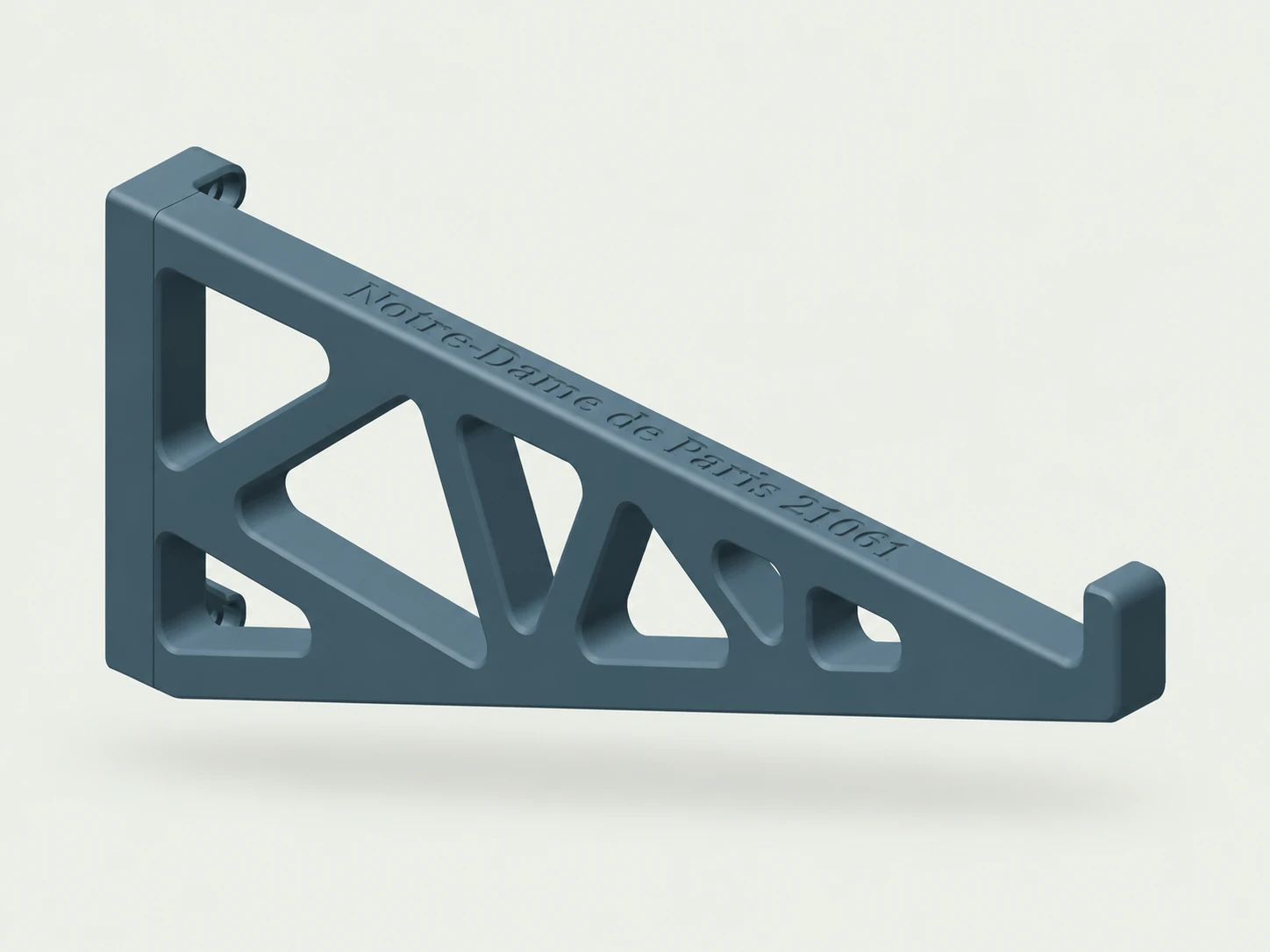
Use this guide to position and install your bracket-style wall mount, then place your set securely on its supports. Bracket shape, quantity, and spacing vary by product. Read through the steps first and follow any spacing or placement instructions included with your specific mount.
Before you start
Tools needed
- Screwdriver with a bit that fits your wall screws
- Level
- Tape measure
- Fine-tip pen or pencil
- Stud finder, if needed
- Drill and drill bit, if needed for your screws or anchors
Parts & hardware
- Bracket wall mount supplied for your set (use every bracket included)
- Wall-mounting screws and any required anchors (included only if ordered)
Check your brackets and mounting hardware
Lay out the bracket or brackets supplied with your mount and check that they match the set you plan to display. Inspect the printed parts for visible damage before installation. Identify the side of each bracket that sits against the wall, its mounting holes, and the surface that supports your set. If the brackets are different shapes or have a designated left and right side, follow the orientation shown in the instructions for your product. Have suitable wall screws and any required anchors ready. Wall hardware is included only if you ordered it. Keep your set safely supported away from the installation area while you prepare the brackets and wall.
Determine the support positions and bracket spacing
Before marking the wall, check where the brackets are intended to support your set. Use any spacing measurements, locating features, or placement instructions supplied with the mount. Keep the set securely supported while identifying the intended contact areas underneath it. The brackets should support the intended base or structural sections, not loose decorative pieces or fragile sections. Do not balance the set on uninstalled brackets to test the spacing. For a mount with multiple brackets, measure the spacing between the intended support positions and keep that measurement consistent when transferring it to the wall. Do not move brackets farther apart or closer together simply to reach a wall stud if that leaves the set improperly supported. For a single-bracket mount, identify its intended position under the set. If the correct support location or spacing is unclear, contact BP3DPrintShop before drilling.
Choose the display location and mark the wall
Choose a location with enough clearance for the full size of your set, including parts that extend beyond its base. Leave room to lift the set onto and off the brackets without striking nearby objects, the wall, or the ceiling. Where practical, position the wall screws over a wall stud while maintaining the required bracket spacing. Use a stud finder if needed. Where a wall screw cannot go into a stud, use an anchor suitable for the wall material and the load it will support. Hold the empty brackets against the wall in their intended positions. Use a level and tape measure to check their alignment and spacing. For brackets designed to support the set at the same height, check the level across the supports. Keep any intentionally angled mount in its designed orientation. Mark every required mounting hole, double-check the spacing, and set the brackets aside before preparing the wall.
Prepare the wall for screws and anchors
Follow the screw or anchor manufacturer’s instructions for the correct hole size, drilling depth, and installation method. Check for concealed wiring or pipes before drilling. If anchors are required, prepare the marked holes and install the anchors as directed. For screws going into a stud, prepare any pilot holes required by the screw manufacturer. Keep the hole locations aligned with the marks made from your brackets. Check that the anchors are installed correctly and that the wall around the mounting holes is undamaged. If an anchor spins, a hole is damaged, or a screw or anchor will not hold securely, correct the problem before installing the brackets.
Attach the brackets to the wall
Hold each bracket against the wall and line up its mounting holes with the prepared screw holes or anchors. Start the appropriate wall screws, using all mounting holes required for your brackets. Keep each bracket supported while attaching it. Before fully tightening the screws, check the bracket spacing and alignment again. Tighten the screws gradually with the correct screwdriver until each bracket sits firmly against the wall. Do not overtighten, crush the printed mounting points, or force a bracket to bend against an uneven surface. Gently check each empty bracket for rocking or movement. If a bracket shifts or a wall screw or anchor loosens, stop and resolve the issue before placing your set. Do not pull on the brackets or hang extra weight from them as a test.
Place your set on the brackets
Support your set with both hands and bring it carefully into position over the installed brackets. Ask someone to help if the model is large, awkward, or difficult to support securely. Align the intended support areas with the brackets and lower the set gently into place. Use any locating features or placement instructions supplied with your mount. Check that every required bracket supports the set where intended and that no bracket presses against a fragile or loose section. Gradually release your support only when the set is fully seated and remains stable without rocking, sliding, or tipping. If one bracket is not supporting the set correctly, remove the set before adjusting the installation. Do not force the model to fit or use it to push the brackets into position.
Check the finished display
Check the completed installation: each bracket should remain firmly against the wall, the wall screws and anchors should stay secure, and your set should sit steadily on its intended supports. Confirm that there is adequate clearance around the model. Keep the brackets at their designed display angle. Do not bend them, add improvised spacers, or loosen the wall screws to create a steeper angle. Incorrect spacing or an unstable position can allow the set to slip or fall, causing damage or injury. Support the set whenever you reposition or remove it. If you notice movement, cracking, or loosening later, remove the set and inspect the brackets, wall screws, and anchors before using the display again. Once everything is secure, step back and enjoy your display.