
Set Specific Directions
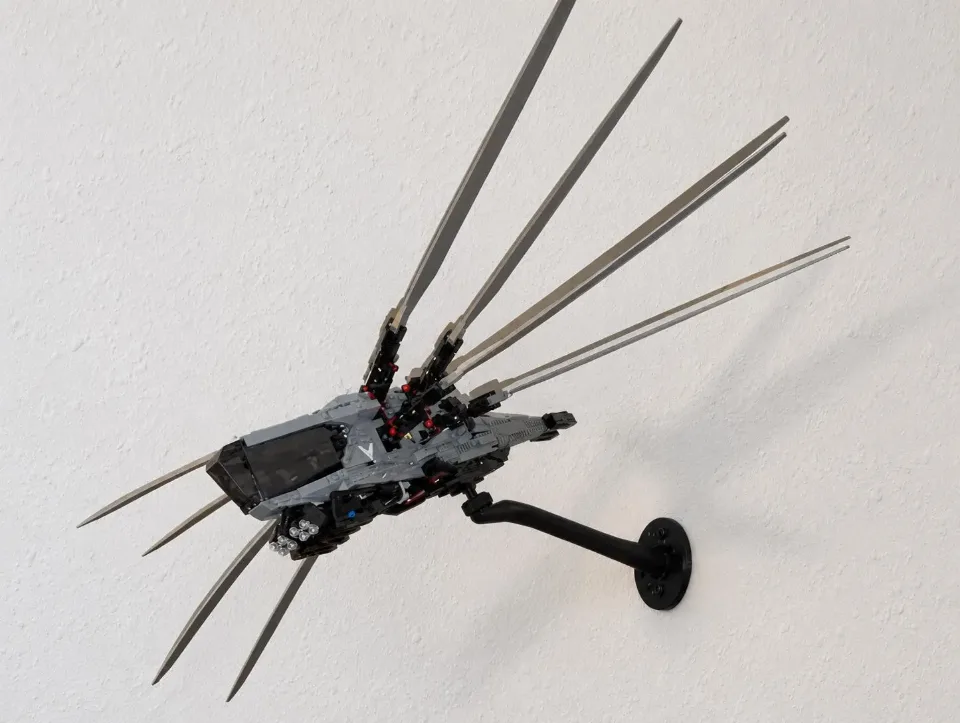
Dune Atreides Royal Ornithopter (10327) — arm wall mount
Install the Ornithopter’s arm-style wall mount and custom 4×8 brick top. The video demonstrates fitting the brick top onto the set; follow the steps below for wall mounting, connecting the set to the arm, and choosing a stable display angle.
Reference 10327
Before you start
Tools needed
- Screwdriver
- Level
- Fine-tip pen or pencil
- Stud finder (optional)
Parts & hardware
- Mounting arm supplied for the Ornithopter
- Custom 4×8 brick top / ball joint
- Screw cover, if included
- Wall screws and suitable anchors, if required (supplied only if ordered)
- Locking bricks for the 4×8 connection
SEE IT COME TOGETHER
Watch the installation
 Watch on YouTubeFollow along with the installation ↗
Opens in a new tab so you can keep these instructions handy.
Check the parts and watch the brick-top video
Lay out the mounting arm, custom 4×8 brick top / ball joint, and optional screw cover. Confirm that the mount matches the Dune Atreides Royal Ornithopter, set 10327. Watch the video above before starting. It demonstrates installing the custom 4×8 brick top onto the set; it does not replace the wall-mounting steps below. Keep the model supported while comparing its underside with the demonstration.
Choose the location and mark the wall
Allow room for the Ornithopter’s full wingspan, body, and tail at your intended display angle. Check clearance from the wall and nearby objects, including any wing movement you plan to use. Choose wall screws and, where needed, anchors suitable for the wall material and the combined load. Follow the hardware manufacturer’s installation instructions and check for concealed services before drilling. Hold the arm against the wall, check its alignment with a level, and mark its mounting holes.
Secure the arm to the wall
Place the arm against the wall and line up its mounting holes with the prepared screw holes or anchors. Start the screws, check the arm’s alignment, then tighten them gradually with a screwdriver. Stop when the arm is held firmly against the wall. The screws should be hand-tight; do not overtighten them or force the printed mounting points to bend. Gently check the arm for movement. If it shifts or rocks against the wall, check the wall screws and anchors before continuing. Do not place your set on the mount until the arm is secure.
Fit the optional screw cover
If using the screw cover, fit it after both wall screws are snug and before installing the ball head. With the socket still bare, align the cover opening with the socket at the tip of the arm. Slide the cover over the socket and along the arm until it seats against the wall plate and conceals the screws. Support the arm and guide the cover gently. If it catches, check the orientation before continuing.
Install the custom 4×8 brick top on the set
Place the Ornithopter on a suitable surface and support its body so the wings, tail, and other delicate parts are not carrying its weight. Follow the video to locate the attachment area and orient the custom 4×8 brick top. Seat the 4×8 top squarely, then fit the locking bricks into the surrounding brickwork as shown in the video. Pause as needed to compare the orientation and connections before pressing parts into place. Keep any pieces removed during the process together and refit them where the demonstration shows. Do not force the brick top or substitute a different attachment location. Check that the brick top is fully seated and that the surrounding brick connections remain secure before lifting the model. If your parts or attachment area do not match the demonstration, stop and contact the shop.
Connect the set to the mounting arm
With the 4×8 top and locking bricks fully engaged, support the aircraft’s weight and seat the adapter ball in the arm socket. Start the locking collar squarely on the socket threads and tighten it by hand. If it binds, back it off and realign it. Keep supporting the set until the collar holds the chosen angle.
Check the balance and adjust the display angle
Keep the model supported while checking how its weight sits over the mount. Use the attachment location shown in the video for this custom brick top; do not move it to an arbitrary point on the underside to change the balance. Start with a level or modest display angle. Make small adjustments while supporting the body, then check the wings and tail for clearance. Hand-tighten the joint enough to hold the position without forcing it. Check stability with the wings in the position you intend to display. Display-angle caution: Steep or overly aggressive angles can move the set’s center of mass away from its support and put extra strain on the arm, joint, and brick connections. The set could detach or fall, causing damage or injury. The joint’s available range does not mean every angle is suitable. If the set shifts, sags, or starts to separate, support it immediately and reduce the angle or remove it to check the connections.
Check the finished display
Gradually release your support only when the set holds its position. Check that the arm remains firm against the wall, the ball joint stays seated, and the custom 4×8 brick top remains fully engaged with the set. Support the model whenever you adjust its angle or wing position, and recheck its balance afterward. If you notice movement, loosening, or separation later, remove the set and check the wall hardware, mount, and brick connections before displaying it again.