
Set Specific Directions
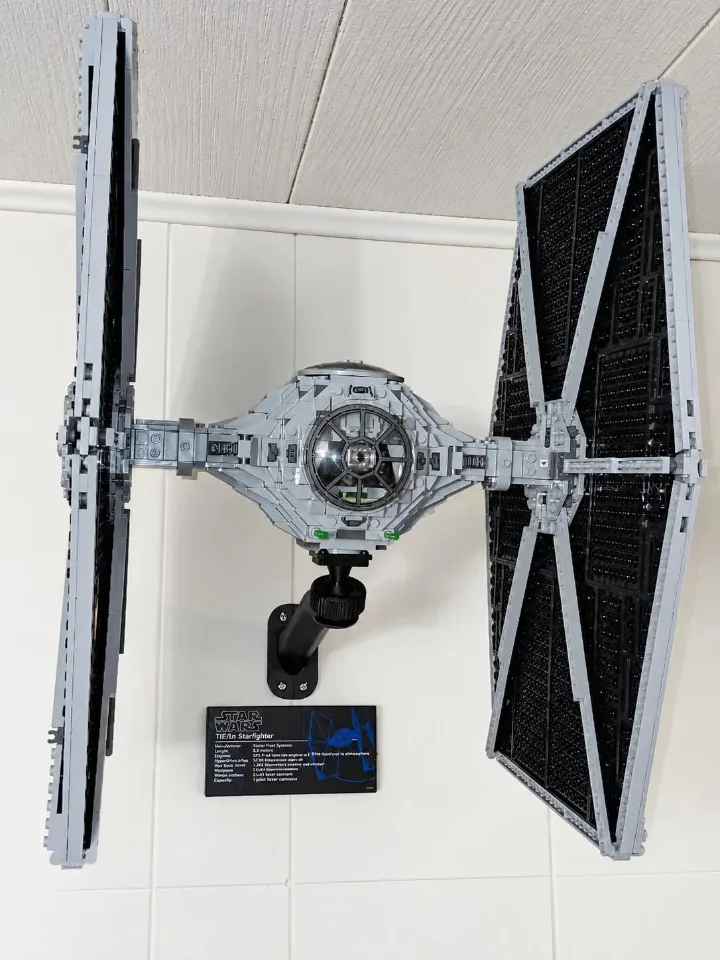
TIE Fighter (75095) — adjustable wall mount
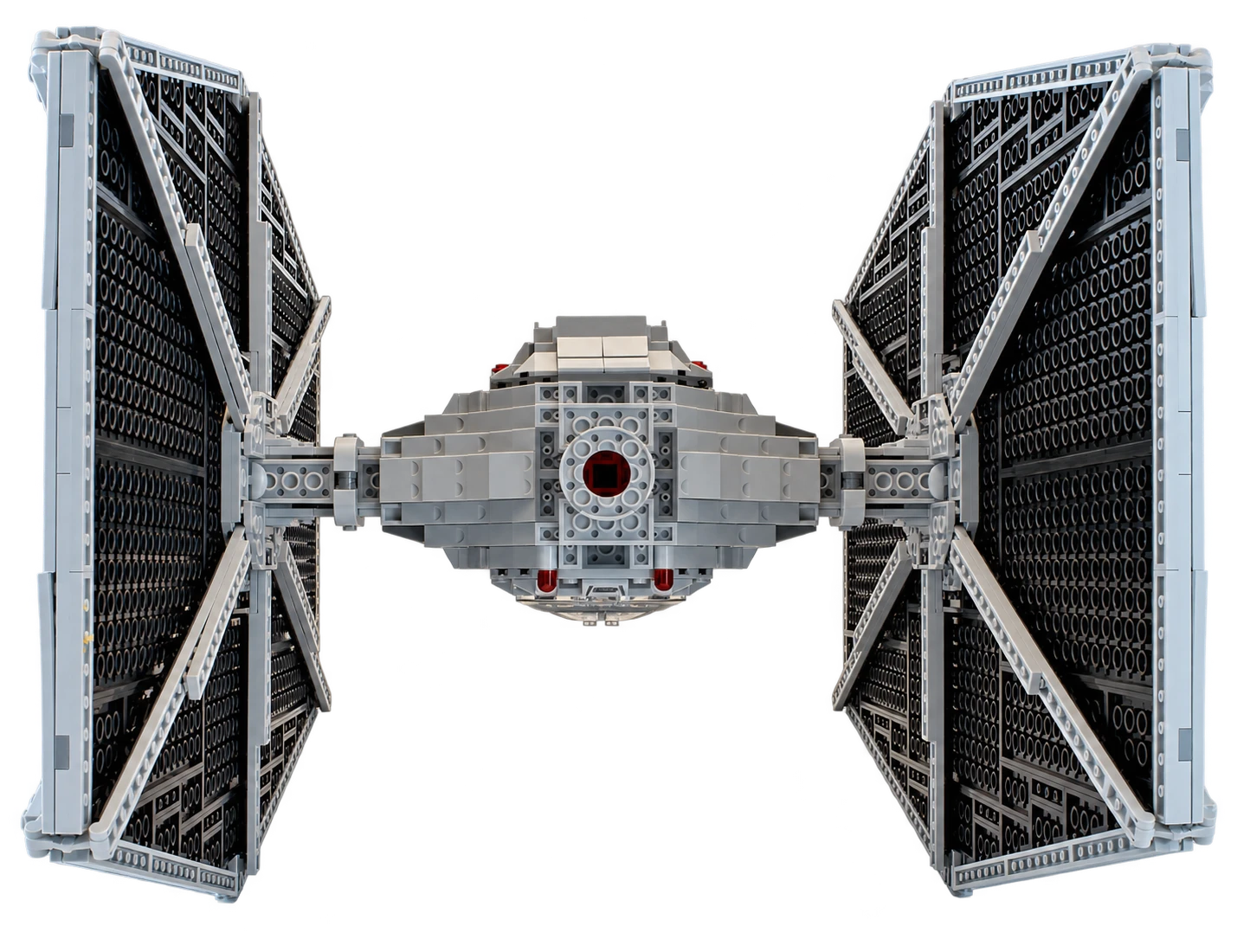
Install the Heavy Duty adjustable wall mount for TIE Fighter™ (75095), fit its custom 4 × 4 brick top into the existing hole underneath the model, and set a stable display angle. Watch the assembly animation, then follow the steps below. The underside photo shows the exact mounting location.
Reference 75095
YOUR SELECTED ITEM
Adjustable Wall Display Stand/Mount for LEGO® TIE Fighter™ (75095)
Before you start
Tools needed
- Screwdriver
- Level
- Fine-tip pen or pencil
- Stud finder (optional)
Parts & hardware
- Heavy Duty mounting arm
- TIE Fighter custom 4 × 4 brick top with raised round center and ball joint
- Threaded locking collar
- Screw cover (if ordered)
- Wall screws and suitable anchors (if required)
SOURCE YOUR OWN HARDWARE
Need mounting hardware?
If you did not order mounting hardware with your mount, use the specifications and links below to source the hardware you need.
Screws & Anchors (Yellow)
- Specifications
- 20.0-lb 1/4-in x 7/8-in Push-In Anchors with Screws
Check the mount and identify the custom brick top
Confirm that you have the Heavy Duty arm and the custom brick top for TIE Fighter set 75095. The top has a square 4 × 4 studded plate, a raised round 2 × 2 center section one brick high, and a ball joint below the plate. The raised round section fits into the existing mounting hole on the underside of the set; the wider square plate sits beneath the surrounding brickwork. The ball joint connects to the mounting arm and provides the angle adjustment. The round center is the set-facing locating feature. Keep the locking collar, top and optional screw cover aside while installing the arm.
Locate the hole on the underside of the TIE Fighter
The photo below looks directly at the underside of the model. Find the circular gray ring in the middle of the central body, between the two wings. The dark opening inside that ring is the mounting hole for the raised round center of your brick top. Align the square plate with the surrounding underside brickwork. This is a fixed, set-specific mounting location; do not choose another opening or move the top elsewhere to adjust the balance. No drilling, cutting or gluing of the set is needed. Keep the model securely supported while inspecting it.
Prepare the mounting location
Choose where you want to display your set, allowing enough space around it for its full size and your preferred display angle. Where possible, position the mount over a wall stud. Use a stud finder if needed. If you cannot mount into a stud, choose anchors suitable for your wall material and the load they will support. Follow the anchor manufacturer’s instructions for preparation and installation. Hold the arm in position, use a level to check its alignment, and mark the mounting-hole locations with a fine-tip pen or pencil. Set the arm aside while you prepare the holes for the wall screws and anchors. Allow clearance for both large wings as well as the central body at your chosen display angle.
Secure the arm to the wall
Place the arm against the wall and line up its mounting holes with the prepared screw holes or anchors. Start the screws, check the arm’s alignment, then tighten them gradually with a screwdriver. Stop when the arm is held firmly against the wall. The screws should be hand-tight; do not overtighten them or force the printed mounting points to bend. Gently check the arm for movement. If it shifts or rocks against the wall, check the wall screws and anchors before continuing. Do not place your set on the mount until the arm is secure.
Fit the optional screw cover
If using the screw cover, fit it after both wall screws are snug and before installing the ball head. With the socket still bare, align the cover opening with the socket at the tip of the arm. Slide the cover over the socket and along the arm until it seats against the wall plate and conceals the screws. Support the arm and guide the cover gently. If it catches, check the orientation before continuing.
Assemble the ball joint and locking collar
Follow the GIF to fit the threaded locking collar over the ball-joint assembly and seat the ball in the arm’s socket. Keep the collar square to the thread and start it gently by hand. If it binds or starts crooked, back it off and realign it. Hand-tighten the collar so the joint holds the top securely in a level or modest starting position. Do not use tools to force the collar. The square studded plate and its raised round center face toward the underside of the model.
Seat the brick top in the underside mounting hole
Support the TIE Fighter’s central body with both hands; do not lift or press on the wings to make the connection. Bring the circular mounting hole shown in the photo into line with the raised round center of the brick top. Keep the square plate aligned with the surrounding underside brickwork. Guide the set straight onto the raised round section so it enters the existing hole and the square plate seats evenly beneath the model. Engage the matching brick connections gently while continuing to support the full weight of the set. The top should sit squarely, without rocking, sitting at an angle or pushing bricks apart. If it does not seat naturally, lift the model clear and recheck the top, hole and orientation. Do not force it, enlarge the hole, or tighten the collar to compensate for a poor fit. Keep supporting the model until the connection is fully seated and secure.
Adjust the angle while supporting the model
Keep both hands supporting the model. Loosen the locking collar only enough to allow the ball joint to move, then tilt or rotate the top slightly to choose your display angle. Keep the raised round section fully seated in the same underside hole throughout the adjustment. Retighten the collar by hand to hold the position. Check clearance around both wings and the wall, then gradually reduce your support only when the model stays securely seated and the joint holds its angle. Start with a level or modest angle. The GIF demonstrates the joint’s movement without the model; its full range is not a recommended display range for the TIE Fighter. Steep angles can strain the mount and brick connections and may allow the set to detach. If it shifts or slips, support it immediately and reduce the angle or remove it to check the connections.
Check the finished display
Check that the arm is firm against the wall, the optional cover is in place, the collar is hand-tight, and the custom top remains fully seated in the central underside mounting hole. The model should not rock, slip or pull away from its connection. Support the model whenever adjusting the joint. To remove it, support the central body and gently lift it straight off the custom top without levering against the wings. If anything loosens later, remove the model and check the wall hardware, collar and brick connections before displaying it again.