
General directions
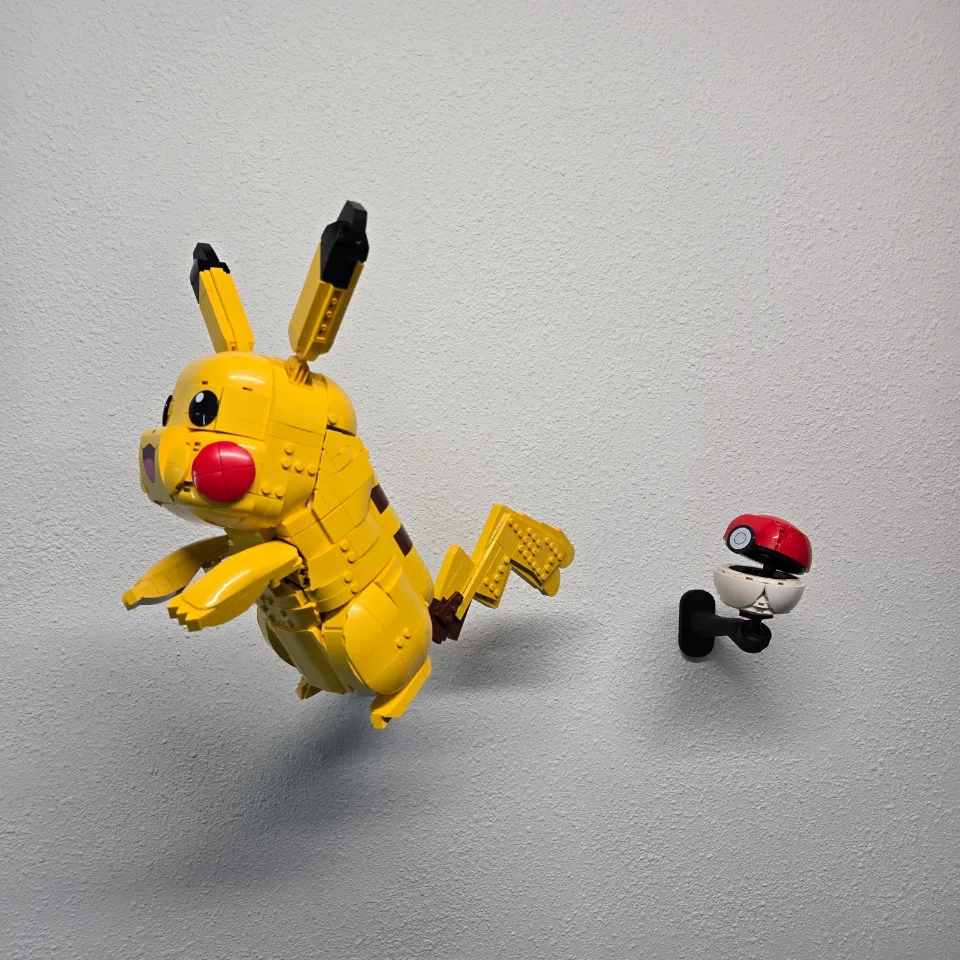
Adjustable Wall Mount for LEGO® Pikachu and Poké Ball (72152)
Use this guide for arm-style wall mounts supplied with a custom brick top designed to fit predetermined holes or mounting points on the underside of your set. The custom top has a specific mounting location and orientation; you do not choose its position by finding the set’s balance point. Follow the steps below to secure the arm, fit the optional screw cover, attach the custom brick top/ball joint, and seat your set on its intended mounting points. Check any additional product-specific instructions before starting.
Before you start
Tools needed
- Screwdriver
- Level
- Fine-tip pen or pencil
- Stud finder (optional)
Parts & hardware
- Mounting arm
- Set-specific custom brick top/ball joint
- Screw cover (if included)
- Mounting screws and suitable wall anchors (if required)
SOURCE YOUR OWN HARDWARE
Need mounting hardware?
If you did not order mounting hardware with your mount, use the specifications and links below to source the hardware you need.
Screws & Anchors (Yellow)
- Specifications
- 20.0-lb 1/4-in x 7/8-in Push-In Anchors with Screws
SEE IT COME TOGETHER
Watch the installation
 Watch on YouTubeFollow along with the installation ↗
Opens in a new tab so you can keep these instructions handy.
Check your parts
Lay out the parts before you begin. You should have: • The mounting arm • A screw cover, if included with your mount • The custom brick top/ball joint made for your set Confirm that the custom brick top matches your set and mount. Identify the predetermined holes or mounting points on the underside of the set and check how the custom top lines up with them. Use any product-specific photos or instructions to confirm the correct location and orientation. Keep the cover and custom brick top/ball joint aside while you attach the arm to the wall. Have your mounting screws and any required wall anchors ready before starting.
Prepare the mounting location
Choose where you want to display your set, allowing enough space around it for its full size and your preferred display angle. Where possible, position the mount over a wall stud. Use a stud finder if needed. If you cannot mount into a stud, choose anchors suitable for your wall material and the load they will support. Follow the anchor manufacturer’s instructions for preparation and installation. Hold the arm in position, use a level to check its alignment, and mark the mounting-hole locations with a fine-tip pen or pencil. Set the arm aside while you prepare the holes for the wall screws and anchors.
Secure the arm to the wall
Place the arm against the wall and line up its mounting holes with the prepared screw holes or anchors. Start the screws, check the arm’s alignment, then tighten them gradually with a screwdriver. Stop when the arm is held firmly against the wall. The screws should be hand-tight; do not overtighten them or force the printed mounting points to bend. Gently check the arm for movement. If it shifts or rocks against the wall, check the wall screws and anchors before continuing. Do not place your set on the mount until the arm is secure.
Fit the optional screw cover
If your mount includes a screw cover, slide it over the arm and position it over the wall-mounting screws. Check the cover’s orientation and guide it into place gently. If it does not slide easily, stop and check its alignment before continuing. Do not force it onto the arm. If you are not using a screw cover, move on to the next step.
Hand-tighten the custom brick top/ball joint
Fit the custom brick top/ball joint to its attachment point on the arm. Keep the parts aligned as you begin tightening the connection by hand. Tighten until the connection is securely seated. If the parts resist or sit at an angle, stop and check their alignment before continuing. Avoid overtightening. Check that the connection to the arm is secure. Orient the custom top to match the intended holes or mounting points on the underside of your set, following any product-specific instructions. Keep the set supported when bringing it into position in the next step.
Seat the set on its mounting points and adjust the angle
Support the set securely with both hands and bring its predetermined underside holes or mounting points into alignment with the custom brick top. Use the mounting location and orientation intended for that set, as shown in any product-specific instructions. The custom top’s position is fixed by this interface; do not move it to another part of the underside to adjust the set’s balance. Carefully seat the set onto the custom top while continuing to support its weight. Check that all intended contact points are correctly aligned and fully engaged. Do not force the fit. If the set does not seat correctly, lift it clear and recheck the top, mounting location, and orientation before trying again. If you cannot confirm the fit, contact the shop before displaying the set. Once the set is correctly seated, start with a level or modest display angle. Make small adjustments at the ball joint while supporting the set, and check its clearance from the wall and nearby objects. Keep the custom top engaged with the same intended mounting points throughout. Gradually release your support only when the set stays securely seated and holds its position without slipping or pulling away from the top. Display-angle caution: Steep or overly aggressive angles can place extra strain on the mount, joint, and set’s mounting points. This can cause the set to detach or fall, resulting in damage or injury. A joint’s available range of movement does not mean every angle is suitable for every set. Do not force the joint or overtighten it to hold an unstable position. If the set shifts or feels insecure, support it immediately and reduce the angle, or remove it and recheck the intended mounting-point engagement.
Check the finished display
Check the completed installation: the arm should remain secure against the wall, the custom brick top/ball joint should be firmly attached to the arm, and the set should be fully seated on all of its intended underside mounting points in the correct orientation. The set should stay at its chosen angle without slipping, lifting away, or pulling apart at those connections. If fitted, check that the screw cover is positioned neatly over the mounting screws. Once everything is secure, step back and enjoy your display. Support the set whenever you make further adjustments. If you notice movement or loosening later, remove the set and check the wall screws, anchors, custom top/ball joint, and the set’s intended mounting points before displaying it again.