
Set Specific Directions
Wall Mount for LEGO® Tiny Plants (10329)
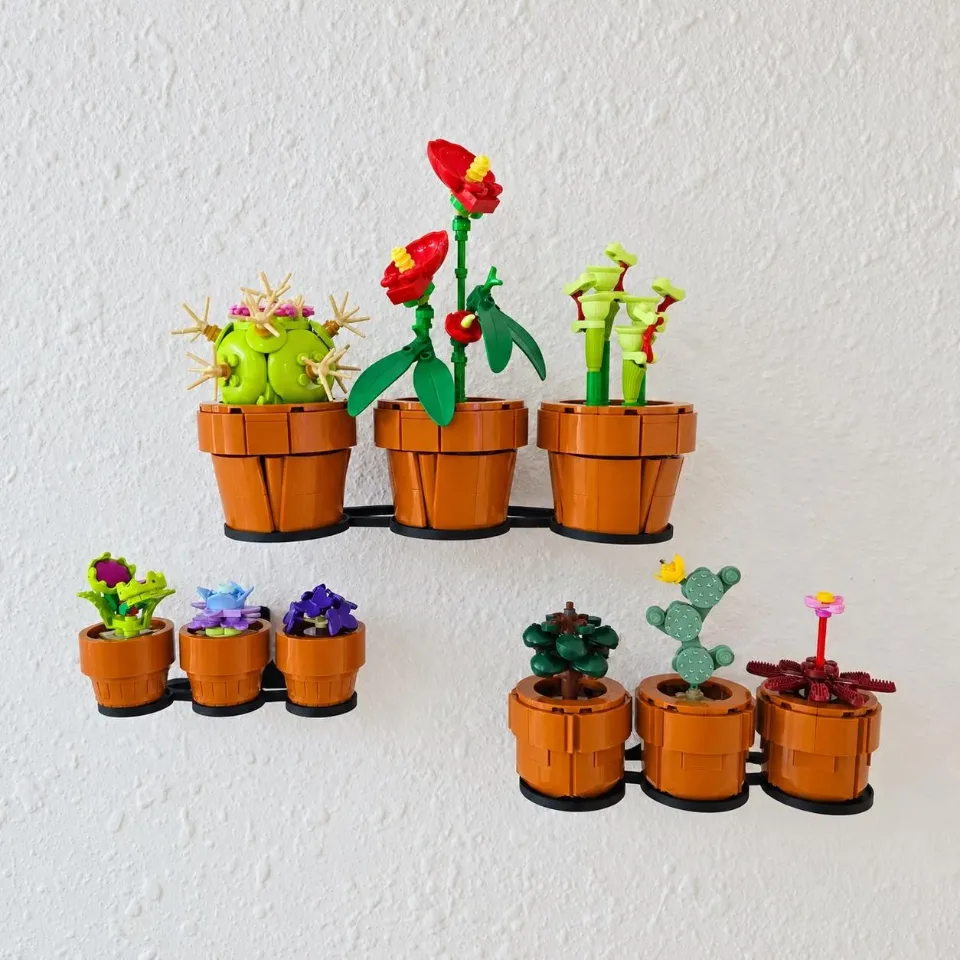
Choose the instructions for the display option you ordered: a combined multi-part tray, separate single-piece trays with screws, or the Tiny Plants Separate Command option. Screw-mounted options use yellow screws and anchors. Follow only the installation section for your option, then place the plants and check the display.
Reference 10309, 10329
Before you start
Tools needed
- Level
- Tape measure
- Fine-tip pencil
- Screwdriver for screw-mounted options
- Stud finder and drill if required for your wall hardware
- Surface-preparation supplies specified on your Command strip packaging, for the Separate Command option
Parts & hardware
- Combined option: set-specific tray, matching wall brackets, supplied assembly screws and washers
- Separate screw option: individual single-piece trays
- Screw-mounted options: yellow screws and anchors (supplied only if ordered)
- Tiny Plants Separate Command option: Command-compatible individual trays and the strips specified for those trays
SOURCE YOUR OWN HARDWARE
Need mounting hardware?
Yellow screws and anchors are for the combined tray and separate screw-mounted trays. The Tiny Plants Separate Command option uses Command strips instead; follow the strip packaging for compatible surfaces, installation, and removal. Confirm that the selected hardware suits your wall. Its listed rating is not a load rating for the complete printed mount.
Screws & Anchors (Yellow)
- Specifications
- 20.0-lb 1/4-in x 7/8-in Push-In Anchors with Screws
Choose your installation section
Match the parts to the option on your order before starting. A — Combined display: one tray with separate supporting brackets. Follow steps 3–4. B — Separate screw-mounted display: multiple trays, each made as one complete piece. Follow steps 5–6. C — Tiny Plants Separate Command: individual trays designed for Command strips. Follow steps 7–8. This adhesive option applies to Tiny Plants 10329. All options: plan the layout in step 2, then finish with steps 9–10. Use the trays made for your set: Succulents 10309 or Tiny Plants 10329.
Plan the display layout
Lay out your plants and the empty tray or trays on a stable surface. Compare each plant’s base with its intended support area so you know where it will sit. For separate trays, plan the arrangement and leave enough space between plants for projecting leaves and flowers. Allow room to lift each plant into place and remove it later without catching adjacent plants or the ceiling. Keep the models off the trays throughout installation. Check the printed parts for damage before continuing.
A — Assemble the combined tray
For the combined display only: match the supplied brackets to the tray’s attachment holes and check their orientation. Use all brackets supplied for that tray. Attach them with the supplied assembly screws and washers, starting each screw before fully tightening the others. Tighten gradually and evenly until the parts sit firmly together. Do not bend the printed parts or force a screw that resists. Keep the tray-to-bracket assembly screws separate from the yellow wall screws and anchors; they serve different connections.
A — Mount the combined tray to the wall
Hold the empty assembled mount against the wall, check its alignment with a level, and mark the mounting holes. Keep the tray at its designed display angle. Check for concealed services before drilling. Use the yellow screw-and-anchor kit where suitable for your wall and follow its instructions for preparing the holes and installing anchors. Support the assembly while starting the wall screws. Recheck alignment, then tighten gradually until the brackets sit firmly against the wall without distorting. Check that the wall connections and tray-to-bracket connections are secure. If anything moves or rocks, correct it before loading the tray. Continue to step 9.
B — Position the separate screw-mounted trays
For separate screw-mounted trays only: each tray is a single finished piece and needs no bracket assembly. Match the trays to the plants they support, then hold each empty tray in its planned position. Check its alignment and mark the wall holes. Confirm the spacing against your planned plant arrangement rather than guessing from the empty trays alone. Leave clearance for the full size of each plant.
B — Secure each separate tray
Check for concealed services before drilling. Prepare each marked position using the yellow screws and anchors, following the hardware instructions and confirming suitability for your wall. Support each empty tray while starting its wall screws. Check alignment, then tighten until secure without crushing or bending the printed mounting points. Check every tray individually for movement before placing plants. Correct loose hardware or damaged holes first. Continue to step 9.
C — Prepare the Tiny Plants Command option
For Tiny Plants Separate Command trays only: use the Command strips specified for these trays. Check the packaging for compatible surfaces, load limits, preparation, and removal instructions. Account for both the tray and plant when assessing the load. Do not assume a strip intended for another use is suitable. Plan the positions before applying adhesive. Prepare the wall and the tray’s strip-contact surface exactly as directed on the strip packaging. Use this option only with the trays designed for Command strips. Manufacturer guidance: https://www.command.com/3M/en_US/command/contact-us/faqs/
C — Attach the trays and wait before loading
Fit the strips to the intended contact area on each Command-compatible tray and attach the empty tray to the wall following the instructions for your exact strip product. Follow the specified pressing sequence and keep any removal tabs accessible. Leave the trays unloaded for the full waiting period stated on the packaging before adding plants. If your strip type requires a removal and reattachment sequence during installation, follow that sequence as well. If a strip or tray lifts, shifts, or does not attach correctly, stop and correct the installation before continuing to step 9.
Place the plants on the installed trays
Once your chosen installation is complete—and any Command-strip waiting period has passed—lift each model by its base or pot. Avoid lifting by stems, flowers, or leaves. For the combined display, arrange the plants within the tray’s intended support areas. For separate trays, place each plant on its matching tray. Check that each base sits properly within any locating features and is supported without rocking or balancing on an edge. Gradually release your support only when the plant is stable.
Check the display and remove plants before adjustments
Check every loaded tray for stability and clearance around the plants. For screw-mounted trays, check that the wall screws and any assembly connections remain secure. For Command-mounted trays, check for lifting or separation and stay within the strip product’s instructions. Remove the plants before repositioning, tightening hardware, or removing a tray. For Command trays, follow the removal method for your exact strip product rather than pulling the tray away by force. If any tray or connection loosens, remove its plant and correct the installation before using it again.