
Set Specific Directions
Wall Mount for LEGO® NASA Space Shuttle Discovery (10283)
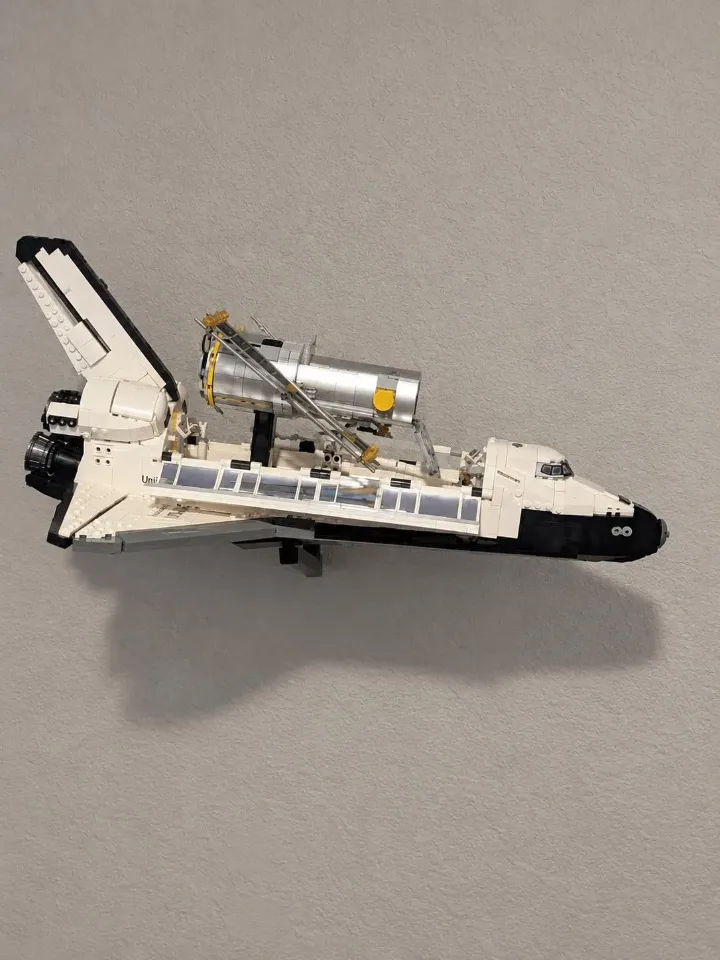
Install your wall mount for NASA Space Shuttle Discovery (10283) using the shuttle-specific mounting head and adjustable ball joint. The custom head fits the predetermined mounting points on the underside of the shuttle. Follow the animation and steps below to assemble the mount, seat the shuttle, and secure its display angle. The optional Hubble add-on supports the Hubble telescope included in set 10283. Steps 1–7 and the animation cover Discovery; use steps 8–9 for the Hubble add-on if ordered.
Before you start
Tools needed
- Screwdriver
- Level
- Fine-tip pen or pencil
- Stud finder (optional)
Parts & hardware
- Mounting arm
- Shuttle-specific mounting head with ball joint
- Threaded locking collar
- Optional screw cover
- Mounting screws and suitable wall anchors (if ordered)
- Optional Hubble add-on, only if selected: separate adjustable wall arm, Hubble display-base support and locking collar
SOURCE YOUR OWN HARDWARE
Need mounting hardware?
If you did not order mounting hardware with your mount, use the specifications and links below to source the hardware you need.
Screws & Anchors (Yellow)
- Specifications
- 20.0-lb 1/4-in x 7/8-in Push-In Anchors with Screws
Check your shuttle mount parts
Lay out the mounting arm, shuttle-specific mounting head with ball joint, threaded locking collar, and optional screw cover. Check that the head is the version supplied for NASA Space Shuttle Discovery (10283). Have your mounting screws and any suitable wall anchors ready. Watch the animation before assembly to see the orientation of the head, collar, and cover. Keep the shuttle safely supported while preparing the wall mount. Check your order: Heavy Duty With Hubble Add-on includes the additional Hubble mounting assembly. Heavy Duty Without Hubble Add-on includes the shuttle mount alone. The accessory is for the Hubble telescope supplied with set 10283.
Prepare the mounting location
Choose a location with room for Discovery’s wings, tail, and nose at your intended display angle. Allow clearance from the wall and nearby objects. Where possible, mount into a wall stud. Otherwise, use anchors suitable for your wall material and the combined load, following the anchor manufacturer’s instructions. Hold the arm in position, check it with a level, and mark the mounting holes before preparing them.
Secure the arm to the wall
Align the arm with the prepared screw holes or anchors. Start the screws, check the alignment, then tighten them gradually with a screwdriver. Stop when the arm is firm against the wall. Do not overtighten or bend the printed mounting points. Gently check for movement; the arm must not shift or rock before you attach the shuttle.
Fit the optional screw cover
If using the screw cover, fit it after both wall screws are snug and before installing the ball head. With the socket still bare, align the cover opening with the socket at the tip of the arm. Slide the cover over the socket and along the arm until it seats against the wall plate and conceals the screws. Support the arm and guide the cover gently. If it catches, check the orientation before continuing.
Fit the shuttle head and locking collar
Follow the animation to position the locking collar and seat the shuttle-specific head’s ball joint in the arm socket. Keep the parts aligned and turn the threaded collar by hand to secure the head. The collar locks the ball joint; do not use tools to force it tight. If the threads resist or the head is not seated correctly, stop and realign the parts. Check that the head holds its position before fitting the shuttle.
Seat Discovery on its dedicated mounting points
Support the shuttle with both hands and align the custom mounting head with its matching, predetermined mounting points on the underside of the set. Check the head’s orientation and gently seat the shuttle until the intended connections are fully engaged. This head uses a fixed mounting location. Do not choose an alternative brick-top position by balancing the model or attach it to loose or decorative sections. If the head does not align or seat properly, lift the shuttle away and check the orientation instead of forcing it. Continue supporting the shuttle while checking the connection.
Adjust the angle and check the finished display
Support the shuttle’s full weight before loosening the collar. Loosen only enough to adjust the ball joint, make a small tilt or rotation as shown in the animation, then retighten the collar by hand. Start with a level or modest angle and check clearance around the wings, nose, and tail. The joint’s full range of movement is not a guarantee that every angle is suitable for this set. Do not force the joint or overtighten the collar to hold an unstable position. Confirm that the arm is secure, the shuttle is fully seated on its dedicated mounting points, and the head holds its angle without slipping. Gradually release your support only when everything is stable. Support the shuttle during every later adjustment. If anything shifts or loosens, remove the shuttle and check the mount and connections before displaying it again.
Optional Hubble add-on: install its wall arm
Skip this step and step 9 if you selected the shuttle mount without the Hubble add-on. The Hubble assembly mounts separately to the wall. Plan its position with clearance for the telescope, open lid and solar panels. Keep the telescope and its display base off the support while installing the arm. Use the Hubble arm itself to mark all its wall holes, then prepare suitable screws and anchors as in steps 2–3. Secure the empty arm and fit its optional cover before the ball joint, as in step 4. Seat the Hubble support’s ball in the socket and start the collar squarely; tighten it by hand without forcing the threads. Check that the arm and empty support are secure. The animation above illustrates the Discovery head; use the Hubble support supplied with the add-on for this assembly.
Optional Hubble add-on: seat the display base
Keep the Hubble telescope attached to its LEGO display stand. The product photo shows that stand’s black base resting inside the shaped support on the adjustable arm. Support the telescope and stand together, then seat the base fully in the supplied support, matching the orientation shown in the Hubble product photos. Do not support the telescope by its solar panels or attach the Discovery head to it. With the full assembly still supported, check that the base is seated and the telescope clears the wall and nearby models. Keep the support level or at a modest stable angle. If adjustment is needed, support the assembly before loosening the collar and retighten it by hand. Release your hands gradually only when the base and joint remain secure. Remove the telescope and display stand before moving the wall arm. Hubble mounting reference photo: https://cdn.shopify.com/s/files/1/0859/1700/8108/files/7378b9e1-il_fullxfull.7838739969_sirs.jpg?v=1793132115